Getting Started
Native controls with reusable behavior and replaceable presentation, built on xgpui as part of xgui.
xgpui-luma is part of the xgui ecosystem. Its releases generally follow shortly after xgpui releases, keeping the controls, Looks, color tools, and plots aligned with the framework. Use the compatible dependency versions shown below; Luma and xgpui have separate version numbers.
Looking for gpui-luma? The original gpui-luma, based on gpui-unofficial, is still available at gpui-luma-dev/gpui-luma.
Run the sample apps
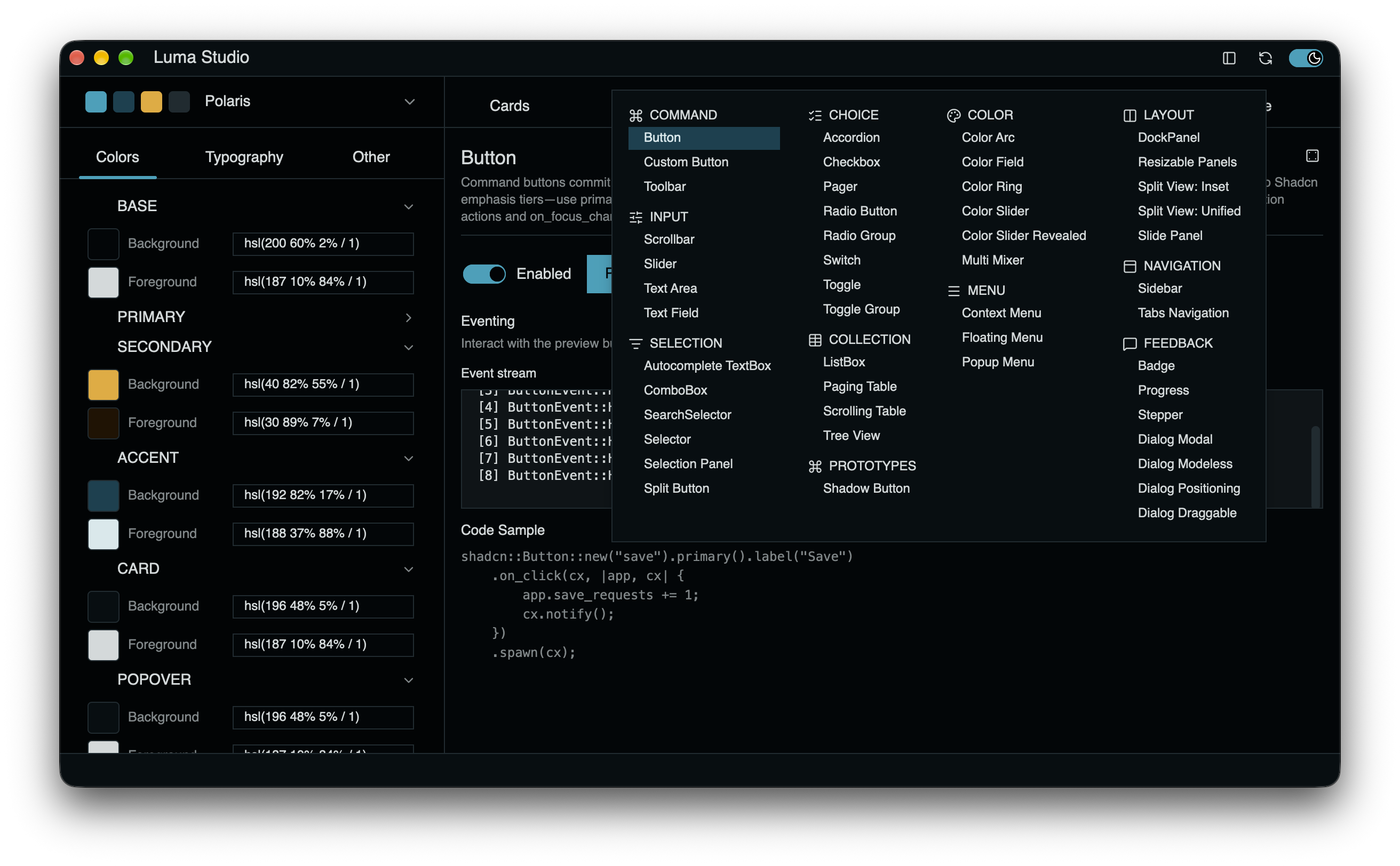
Explore the runnable apps alongside these docs. The repository includes workbenches for both Looks, a native chart gallery, and sample application shells. Their source shows how controls, themes, layouts, and events fit together in a complete application.
Use release builds for optimal app performance. Debug builds are intended for development and can make rendering and interactions noticeably slower. The app recipes below use release builds by default.
Clone the repository to run its sample apps. From the repository root, use the following justfile recipes. They launch native desktop applications in release mode by default; use just --set profile dev <recipe> for development builds. Run just to list recipes without launching an app. Without just, use cargo run -p <package> --release.
| Sample / source | What to explore | Run |
|---|---|---|
| XGPUI Lab | Framework extension examples for canvas, text, media, SVG, shaders, color and gamut, plus gradient editing and Luma compositions. | just app-lab |
| Luma Studio | Shadcn control examples and theme inspection. See Look-shadcn. | just app-studio |
| Radix Studio | Radix style guide, palette editor, and control previews. See Look-radix. | just app-radix |
| Plot Viz | Native SDK application with line, area, bar, pie/donut, radar, and radial chart galleries. Monochrome SDK controls support live light/dark switching; chart colors use independent palettes. See Plots. | just app-plot |
| Detached shell | A sample application shell with detached-style regions. | just shell-detached |
| Split-titlebar shell | A sample shell with a split titlebar layout. | just shell-split-titlebar |
| VS Code shell | A workbench-style shell with configurable workspace regions. | just shell-vscode |
| Shell 2026 | An alternative application shell and titlebar composition. | just shell-2026 |
Shell themes: the shell recipes use the default theme when no argument is given. To choose a built-in Shadcn theme, pass it directly, for example just shell-vscode retro-arcade. Radix Studio uses Radix palettes; Plot Viz uses the SDK baseline. Neither accepts Shadcn named CSS themes.
Development: use just --set profile dev app-studio, just --set profile dev app-radix, or just --set profile dev app-plot. just --set profile dev app-studio-backtrace enables Rust backtraces in debug mode; just perf-studio enables the Metal HUD in release mode.
Library checks: just sdk-check, just sdk-build, just sdk-test, just sdk-clippy, and just sdk-doc-test provide SDK/library checks. Check, build, and Clippy target the five default library crates; test recipes use CI’s selected library suites, including luma-app-common in sdk-test. Use just workspace-check, just workspace-build, or just workspace-test for the full workspace. just apps-build compiles all native apps without launching them. just ci runs formatting checks, Python helper tests, workspace Clippy, selected library tests and doc-tests, and control documentation checks. Use just fmt to format the workspace.
Documentation checks: run just docs-check to compile the Rust examples and just wasm-check to lint the browser runtime. Run python3 -B -m unittest discover -s apps/docs-embed -p 'test_*.py' for runtime packaging tests. Check scripts with node --check docs/site.js, node --check docs/navigation.js, and node --check docs/examples/embed.js. These checks do not launch applications. Install Node.js and add the wasm32-unknown-unknown Rust target first.
Library dependencies
Luma’s framework dependencies are xgpui 3.1.0, xgpui-platform 2.0.3, and xgpui-web 2.0.3. The examples use gpui, gpui_platform, and gpui_web as local Cargo aliases; the package field identifies the actual registry crate.
The dependency examples target this repository’s 1.0.1 library crates. Once those versions are published to crates.io, use them in your own Rust application without a repository checkout. Start with cargo new luma-hello, then use the dependencies and src/main.rs in the complete app below. Run cargo build to build it or cargo run to launch it.
Support includes the SDK’s built-in light/dark styling, Shadcn, and Radix. Add xgpui-luma-color = "1.0.1" for color controls or xgpui-luma-plot = "1.0.1" for charts. Use a recent stable Rust toolchain and your platform’s native xgpui build prerequisites.
Use 1.0.1 for Luma dependencies to accept compatible 1.x releases. Run cargo update to refresh versions already recorded in Cargo.lock.
Framework packages and import aliases
| Cargo package | Alias / Rust import in these docs |
|---|---|
xgpui | gpui |
xgpui-platform | gpui_platform |
xgpui-web | gpui_web (browser runtime) |
gpui-unofficial and other packages ending in -gpui-unofficial are distinct registry packages. An import such as gpui::Context in these examples resolves to xgpui through the alias above. When discussing a dependency, use its full Cargo package name; preserve the actual package names when reporting transitive dependencies.
Package names use hyphens; Rust imports use underscores. The framework package xgpui is separate from the xgpui-luma SDK. The examples retain gpui and gpui_platform dependency aliases to match this repository.
| Crate | Rust import | Purpose |
|---|---|---|
xgpui-luma | xgpui_luma | SDK controls, layouts, and theme contracts |
xgpui-luma-look-shadcn | xgpui_luma_look_shadcn | Shadcn look and builders |
xgpui-luma-look-radix | xgpui_luma_look_radix | Radix look and builders |
xgpui-luma-color | xgpui_luma_color | Color controls and rendering |
xgpui-luma-plot | xgpui_luma_plot | Charts and plotting |
Updating from 1.0.0
Replace the gpui-luma, gpui-luma-color, gpui-luma-look-shadcn, gpui-luma-look-radix, and gpui-luma-plot package names with their xgpui-luma* equivalents. Update Rust imports from gpui_luma* to xgpui_luma*. The framework aliases gpui, gpui_platform, and gpui_web can stay as shown above.
This candidate requires xgpui 3.1.0; use xgpui-platform 2.0.3 and xgpui-web 2.0.3 where needed. Framework packages have independent version numbers. Use compatible Cargo ranges without an exact = pin, run cargo update, and rebuild and test before releasing. Keep the application lockfile for reproducible builds. For 0.x extensions, a normal Cargo range accepts patch updates within the same minor version.
The locked transitive *-gpui-unofficial support crates are now 1.27.0. They are resolved through the framework dependencies; keep xgpui as the main framework package rather than substituting gpui-unofficial.
Applications calling modifier helpers must now pass the app context to Modifiers::secondary(cx) and Modifiers::secondary_key(cx). Direct users of MetalHeadlessRenderer::new() must handle its Result, for example with ? in a fallible function. See motion inspection and custom color thumbs for the new Luma APIs.
What you get
Controls, layouts, focus and input handling, semantic events, and customizable templates. Shadcn and Radix Look crates provide ready-to-use styling.
Philosophy & design
The SDK owns behavior. Templates own presentation. Looks configure a visual system. Customize content, modify a template, or replace it without rebuilding the control’s interaction logic.
A small complete app
A single window with a native Shadcn button. Once the library versions are published, use these dependencies in the new app’s Cargo.toml:
[package]
name = "luma-hello"
version = "0.1.0"
edition = "2024"

[dependencies]
# These aliases refer to xgpui packages.
gpui = { package = "xgpui", version = "3.1.0" }
gpui_platform = { package = "xgpui-platform", version = "2.0.3", features = ["font-kit"] }
xgpui-luma = "1.0.1"
xgpui-luma-look-shadcn = "1.0.1"use gpui::{prelude::*, Context, Entity, Render, Window, WindowOptions, div};
use xgpui_luma::controls::button::Button;
use xgpui_luma::infra::presenter::HasPresenter;
use xgpui_luma_look_shadcn as shadcn;
struct Hello {
button: Entity<Button>,
saves: usize,
}
impl Hello {
fn new(cx: &mut Context<Self>) -> Self {
let button = shadcn::Button::new("hello")
.primary().label("Hello, Luma")
.on_click(cx, |app, cx| {
app.saves += 1;
cx.notify();
})
.spawn(cx);
Self { button, saves: 0 }
}
}
impl Render for Hello {
fn render(&mut self, _: &mut Window, _: &mut Context<Self>)
-> impl IntoElement
{
div().size_full().flex().flex_col().gap_2().items_center().justify_center()
.child(self.button.clone())
.child(format!("Saved {} times", self.saves))
}
}
fn main() {
gpui_platform::application().run(|cx| {
if let Err(error) = xgpui_luma::init(cx) {
eprintln!("Initialization failed: {error}");
return;
}
xgpui_luma::focus::bind_default_focus_keys(cx);
xgpui_luma::key_handling::bind_default_control_keys(cx);
if let Err(error) = cx.open_window(WindowOptions::default(), |_, cx| {
cx.new(Hello::new)
}) {
eprintln!("Window creation failed: {error}");
return;
}
cx.activate(true);
});
}This standalone app targets the registry dependencies above and does not need the Luma workspace once they are published. Build with cargo build; launch with cargo run.